Make every AI dollar count. See where your LLM spend goes, give every team a budget, and control model access from one gateway on your infrastructure.
Scroll ↓
Introduction01
Companies should get more out of every AI dollar. TollGate gives you one control point for supported model requests your teams send through it.
“
Your best AI ideas deserve room to grow. Your budget deserves a plan. TollGate connects model usage to the teams and projects behind it, puts spending decisions at the point of request, and gives you the clarity to invest in what works.
Connect your AI providers
OpenAI
Anthropic
Amazon Bedrock (AWS)
Previously validated on Bedrock: Amazon Nova, Meta Llama, Mistral, OpenAI gpt-oss, Qwen, DeepSeek, Google Gemma and NVIDIA Nemotron.
Support is confirmed for your exact model and API features before deployment. Need another provider? Talk to us about integration.
Impact02
Control from day one
→
Know what your AI costs. Decide where it goes next. Turn scattered model usage into a clear picture of spend, ownership and control.
A
One gateway
Connect your configured model providers through a shared control point.
B
Every team
Give teams and projects clear budgets and accountable ownership.
C
Your cloud
Run self-hosted containers on infrastructure you control.
D
Every request
Trace governed usage back to its model, project and key.
E
Clear reports
See spend patterns and make the next investment with confidence.
F
Active control
Check applicable budgets before forwarding model requests.
More room to build. More control over the bill. One gateway connects your teams, models and budgets—on infrastructure you own.
Capabilities
01
Metering & Attribution
A per-request ledger by team, model and token. The number finally has an owner.
02
Budget Enforcement
Reserve a conservative cost allowance before forwarding. Requests that exceed an applicable budget are denied.
03
Model Access Controls
Give projects access to supported models and reject requests outside their policy.
04
Spend Reporting
Turn model usage into clear, shareable reports by team, project and provider.
05
Budget Alerts
70 / 90 / 100% threshold alerts in-dashboard and to a Slack-compatible webhook.
Deny a request when its estimated reservation exceeds an applicable budget
Raise a cap from the dashboard, then verify the next admission decision
Alert at 70 / 90 / 100% of budget, before it becomes a surprise
Implementation examples
›Give each AI workflow a defined spending allowance
›Raise a cap mid-month from the dashboard to unblock a launch
›Set permitted models for each project alongside its spending allowance
Data sources
›Per-request spend ledger
›Team budgets & windows
›Virtual keys (hashed)
›Model-tier pricing
Built for your AI workflows
●Customer-facing AI products
●Internal assistants
●Business automation
●Shared model services
THE CONTROL ROOM
Clarity looks like this.
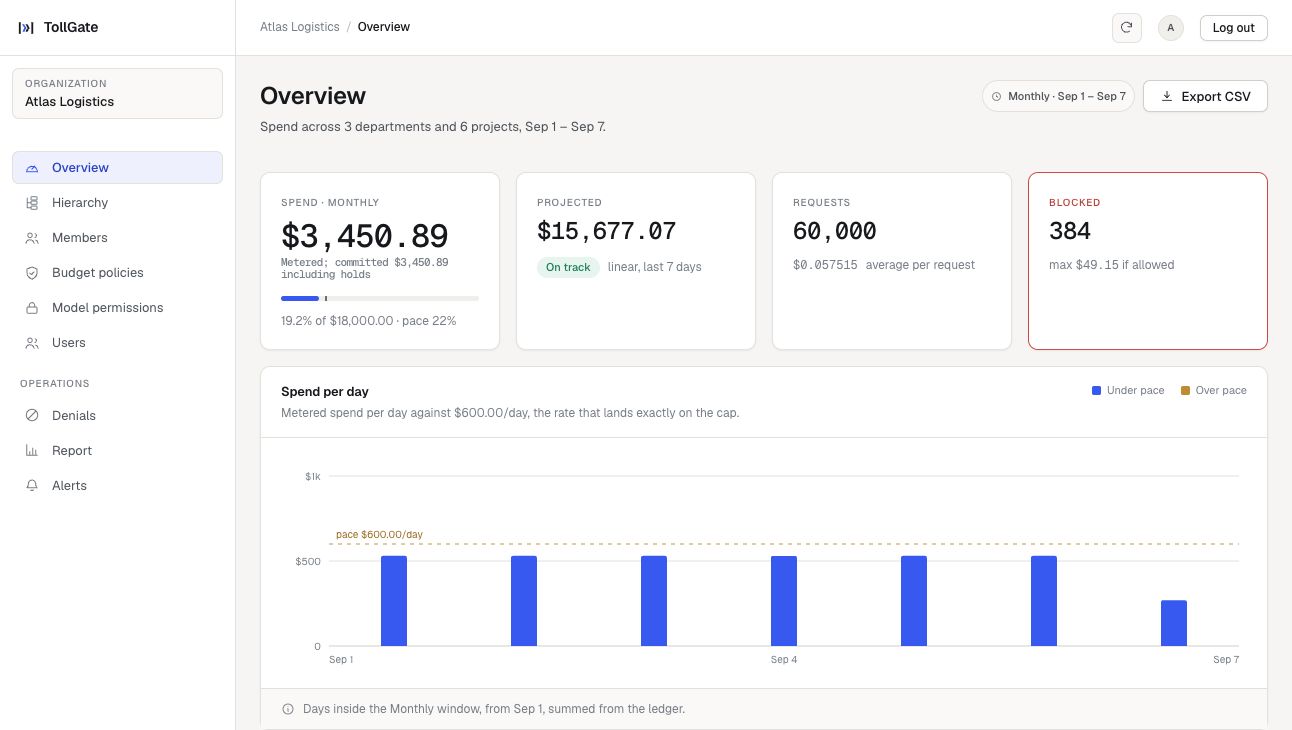
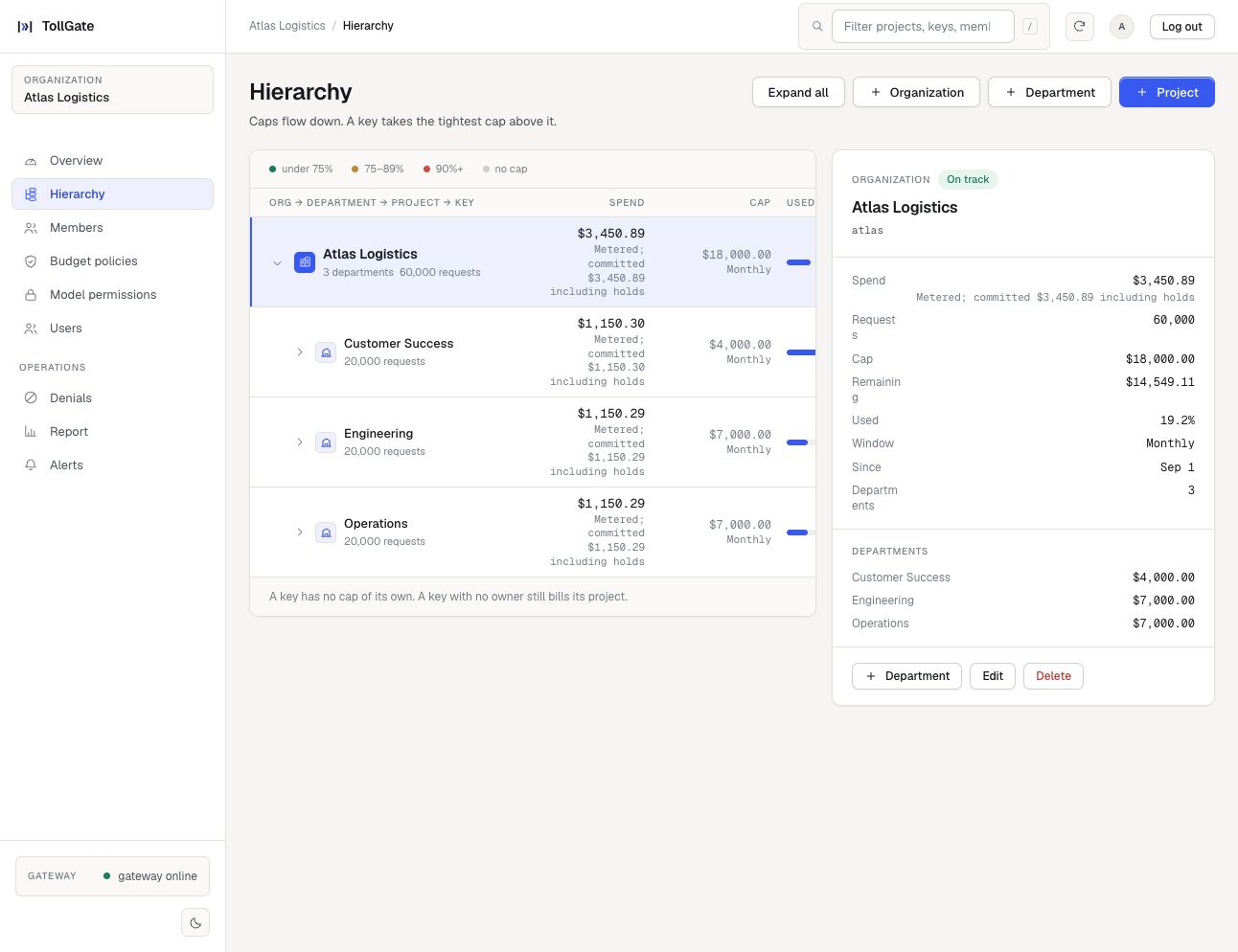
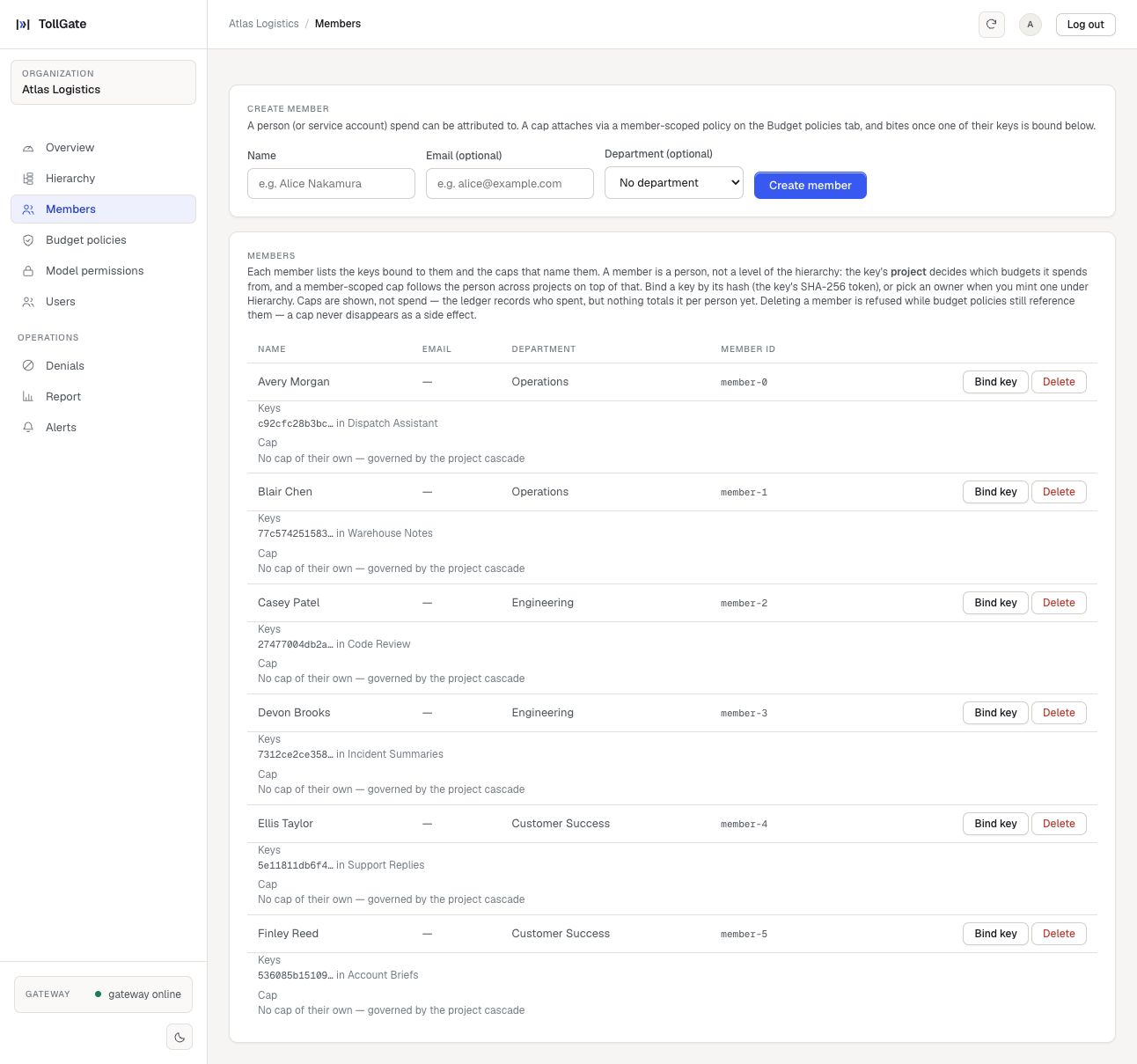
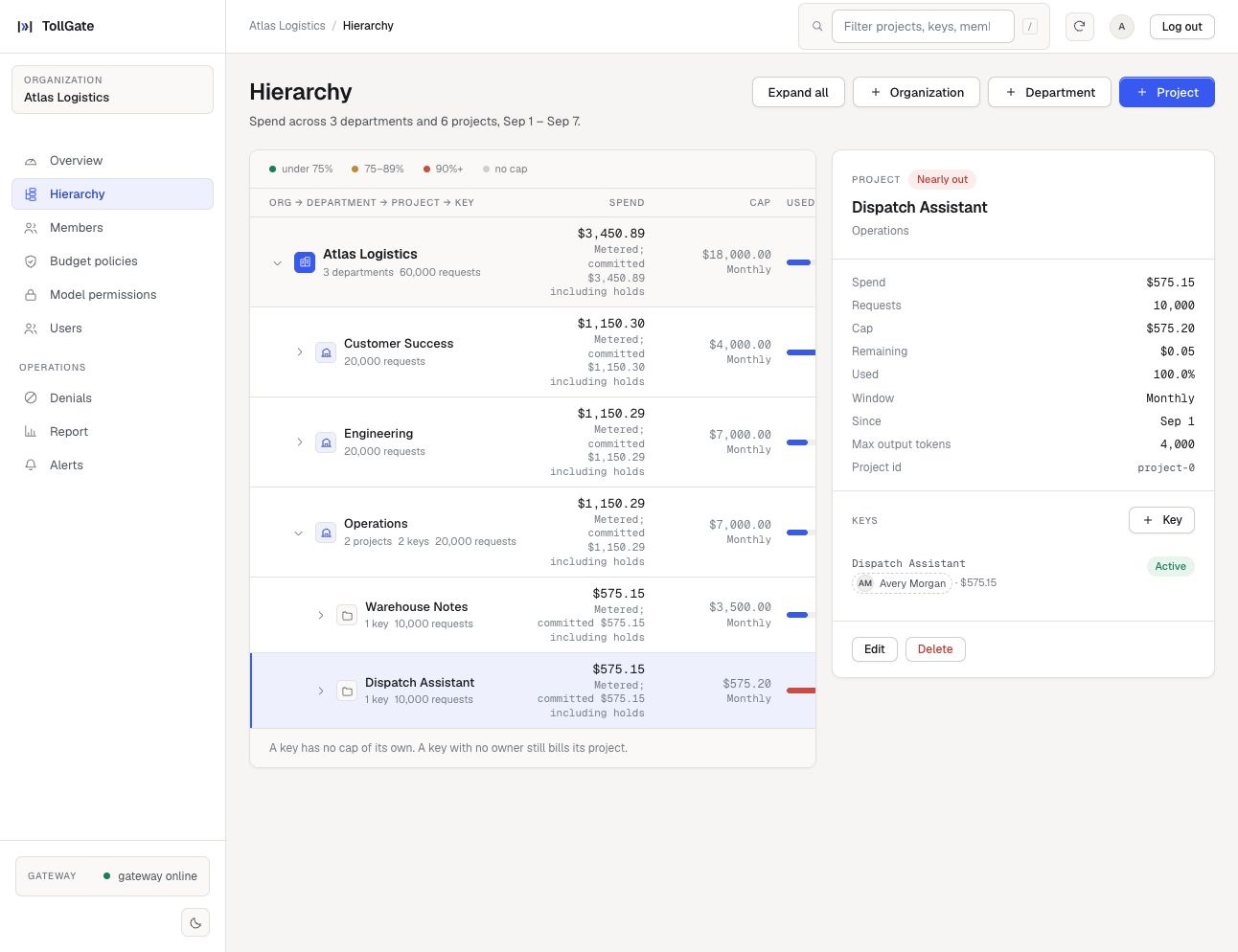
From the company-wide picture to a single project’s budget. See the decisions behind your AI spend.
01 / SPEND OVERVIEWThe whole picture. At a glance.02 / ORGANIZATION & PROJECTSEvery dollar has an owner.03 / PEOPLE & ACCESSConnect access to accountability.04 / PROJECT CONTROLA budget you can act on.
Illustrative dashboard views · Sample data · Explore at full resolution ↗
Metering, Access & Reporting
Attribute reported usage to the teams and projects that generated it
Control which supported models a project can call
Bring a clear spend report to your next business review
Implementation examples
›Find the teams and models driving your AI bill
›Compare model usage before changing your application’s model choices
›Export a dated report to PDF for a board or budget review
Data sources
›Request/response token counts
›Reviewed provider pricing profiles
›Per-model & per-team rollups
›Daily spend series
Built for your AI workflows
●Growing AI portfolios
●Multi-provider workloads
●Product development
●Company-wide AI adoption
Engagement04
Your infrastructure. Your control.
“
The free Developer edition will be available on GitHub from November 8th, 2026, to run on your infrastructure. For a supported deployment, book a call to agree the workload, installation and support scope.
→ The TollGate engagement model
Step 01
Setup
Deploy
The installation guide will be available on GitHub from November 8th. Then connect your own supported provider account.
Step 02
Validation
Observe
See usage by team, project and model. Establish a baseline and identify where your spend goes.
Step 03
Review
Enforce
Set budgets, configure the appropriate enforcement mode, and validate the controls against your workloads.
Supported deployment
Let’s discuss
A deployment and support plan shaped around your workloads.
Tell us how you use AI. We’ll help you scope the right deployment.
Why now05
Alerts aren’t limits
A bill tells you what happened. TollGate helps you decide what happens next—with visible ownership, request-time budget checks and controls your teams can act on.
Built for your first project. Ready for your whole team.
Start with the free Developer plan. Choose more capacity and support as your team grows.
Developer will be available on GitHub from November 8th, 2026 as a free self-hosted preview. Paid plans begin with a scoped pilot; integrations and support are confirmed before purchase.
Developer
For developers building with self-hosted budget controls.
Higher volumes and deployment options quoted separately.
No per-seat fees on paid plans.No token markup. Bring your own model-provider account.
Your AI traffic stays yours. Run TollGate inside your infrastructure, so prompts, responses and provider credentials never need to pass through TollGate’s cloud.
Support by plan — channels & coverage
Developer: Documentation and public GitHub issues, available from November 8th, for questions and bug reports. Best-effort responses, with no guaranteed support hours, response time or 24×7 coverage. Report security issues privately to info@trytollgate.com.
Team: Email support and deployment guidance. Coverage hours, time zone and response targets are agreed before the paid pilot starts.
Business: Priority email support and guided onboarding. Priority does not mean 24×7 coverage; response targets and escalation arrangements are agreed before purchase.
Enterprise: Named technical support with coverage, escalation and response commitments defined in the contract. Extended or 24×7 support is optional and requires a separate agreement.
Contact info@trytollgate.com to agree support coverage. No fixed support hours or response-time SLA are currently published.
Enterprise deployment & support options
Enterprise pricing is tailored to your deployment, usage and support requirements. Request a quote for a scoped customer-cloud deployment. On-premises, air-gapped and dedicated managed deployments are quoted individually after a requirements review.
Support coverage and response commitments are agreed in your contract. Ask us about extended coverage; 24×7 support is not included by default. Custom integrations and professional services are quoted separately.
What counts toward my plan?
Developer includes 25,000 admitted requests per UTC calendar month per installation, 2 dashboard accounts (including admin), 2 governed member records and 3 projects. Requests rejected before admission do not count; provider failures after admission do. Detailed request and audit history is searchable for 7 days. Financial records and backups are retained separately; this is not automatic data deletion.
Paid-plan allowances are measured in governed requests, not tokens or seats. Team includes 500,000 requests/month, with $15 per additional 100,000. Business includes 5 million requests/month, with $25 per additional million. Enterprise volume is agreed in your contract. Your model-provider usage and infrastructure costs are separate.
Paid-plan history allowances refer to the contracted searchable TollGate audit history. You control retention of underlying data on your own infrastructure. TollGate Cloud is a future optional deployment; these plans are built around customer-hosted deployment.
FAQ07
Questions, answered
What to know before putting your AI spend under control. If yours isn’t here, email info@trytollgate.com.
01What is TollGate?
TollGate is an AI gateway that gives you visibility and control over LLM spend. Route your applications through TollGate to track usage by team, project and model, apply budgets, and manage access—all from your own infrastructure.
02How does TollGate complement cloud billing tools?
TollGate connects model spend to the teams, projects and keys behind each request. It adds budget checks at the gateway, alongside the billing and cost-management tools you already use.
03Do our prompts, responses or API keys pass through TollGate’s cloud?
No. TollGate runs on your infrastructure. Your prompts, responses and provider credentials do not pass through a TollGate-hosted service. Your gateway connects directly to the model providers you configure, and you control its credentials.
04What happens when a team hits its budget?
For supported requests in the Developer configuration, TollGate reserves a conservative cost allowance before forwarding. If the available budget cannot cover it, the request is refused. Uncertain provider outcomes retain their reservation. Small budgets can reject even short prompts because the allowance uses a full-context bound. Only traffic sent through TollGate is governed; this is not a universal $0.15-per-response or whole-agent guarantee.
05Which providers and models does TollGate support?
TollGate has integrations for OpenAI, Anthropic and Amazon Bedrock (AWS). The Developer edition planned for GitHub availability on November 8th includes reviewed direct OpenAI and Anthropic models. Bedrock deployments are scoped separately; prior validation covered Amazon Nova, Meta Llama, Mistral, OpenAI gpt-oss, Qwen, DeepSeek, Google Gemma and NVIDIA Nemotron. Each deployment requires a current review of the exact model, pricing and API features. This does not mean every model or endpoint is supported. View the Developer model list — available November 8th or contact us about another integration.
06How does deployment work?
From November 8th, download the compiled Developer package using the GitHub installation guide — available November 8th. Run it on your infrastructure with your own provider accounts. From November 8th, GitHub will provide installers and documentation; the current core source is private. For a paid pilot, Sanrish agrees installation and support with you before onboarding.
07How much does TollGate cost?
Developer is free with the allowances shown above. Team is $99/month or $990/year; Business is $499/month or $4,990/year; Enterprise pricing is available on request. Provider usage and infrastructure costs are separate. Book a call to confirm available features and support.
08How do we start a pilot?
Book a call to scope your workloads and success criteria. Agree deployment, available integrations, evaluation period and support before onboarding.
09Who is TollGate built for?
Any organization with significant LLM usage and spend. Whether you build AI products, run internal assistants or automate business workflows, TollGate helps you understand the bill, assign ownership and control what happens next.
10What should I know before downloading Developer?
From November 8th, download the free Developer edition from GitHub — available November 8th and run it on your own Linux x86-64 infrastructure. It includes 25,000 requests per month, two users, three projects and best-effort support. You pay your model provider and hosting costs separately.
Prepare an email to discuss TollGate. Your details go to Sanrish only when you send the email. Do not include passwords, API keys or customer data. Booking a call opens Calendly, which handles your booking details under its own privacy terms.
Help us improve TollGate With your permission, Google Analytics will measure visits and campaign performance. We do not load Google Analytics until you accept. See our Privacy Policy.